Document AI · OCR annotation
A machine that learned to read — because a person read first
To a machine, a document is a wall of pixels. OCR is a model that learned to read — and it only got there because a person read first, drawing a box over every text region, labeling it, and transcribing what it says.
Key takeaways
In a hurry? Watch the 3-min explainer above, or skim the points below — the whole guide, in seven points.
- OCR annotation means drawing a box over each text region, labeling its type, and transcribing exactly what it says.
- It has two halves: detection (find and box the text) and recognition (read it).
- Those boxed, transcribed pages are the ground truth a model studies until it can read a page it has never seen.
- Reading a document is three layers in one pass — detection (where the text is), recognition (what it says), and key-information extraction (what it means).
- One configurable control covers every page type — receipts and bank statements, legal statutes, charts, KYC and ID documents, handwriting, Arabic, and archival scans.
- The model proposes the boxes and the text; a human confirms the ground truth and signs off. Arabic-first by design — your AI is only as good as the people who taught it.
How does AI learn to read?
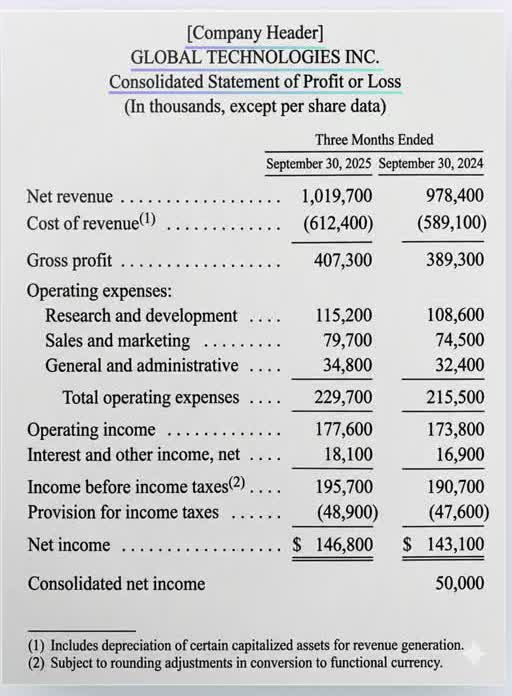
Put an income statement in front of a person and they read words and numbers. Put the same page in front of a machine and it sees a wall of pixels. So how does a machine learn to read that wall? A person reads it first.
A human teaches it. Someone draws a box over each text region, labels what kind of text it is, then transcribes exactly what it says, page after page. That is OCR: optical character recognition converts images of text into machine-encoded characters, and it commonly does it in two stages — detect the text, then recognize it (some systems fuse both into a single end-to-end model). The model that "reads on its own" only reads because a person read first and showed it how. That person is the whole story.
We built the Annota8 Annotation Engine for that exact job — one UI library of 200 annotation interfaces across 9 modalities — and OCR is one of those interfaces. No annotation, no model that can read your documents.
Financial documents
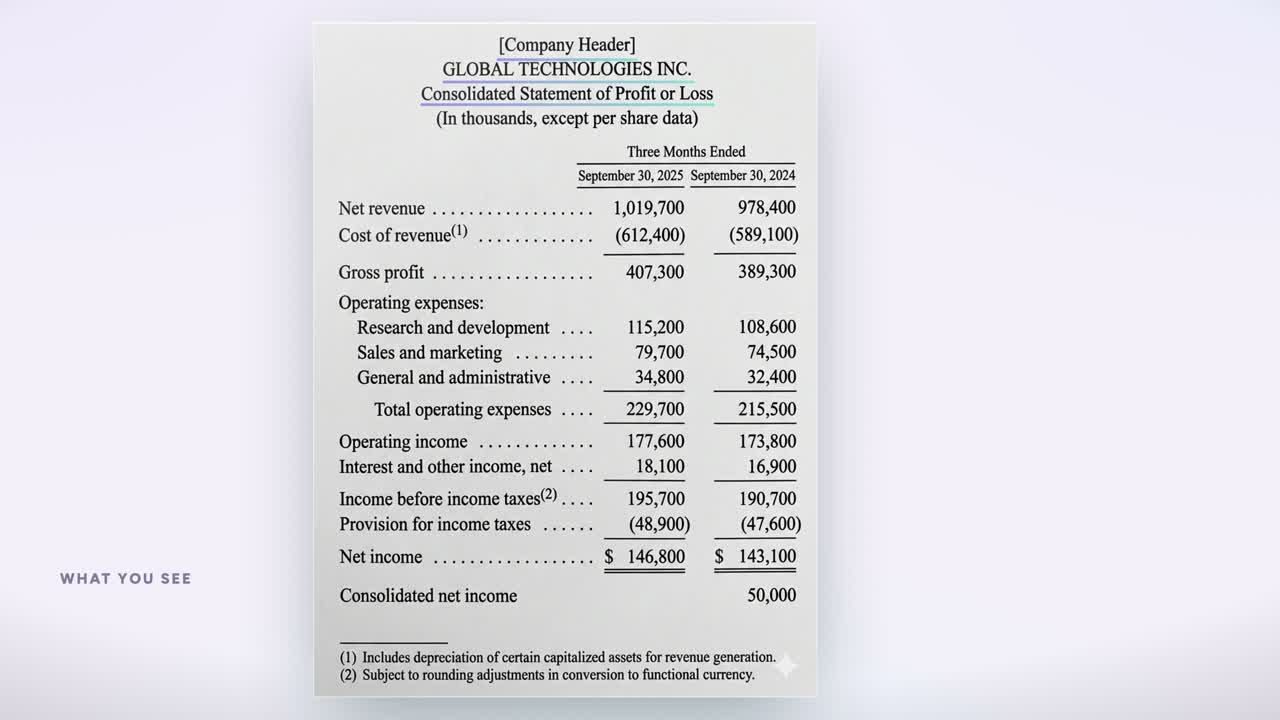
Income statements, bank statements, receipts, and purchase orders — every figure boxed, typed as Total/Amount, and tied to its row.
Charts & figures
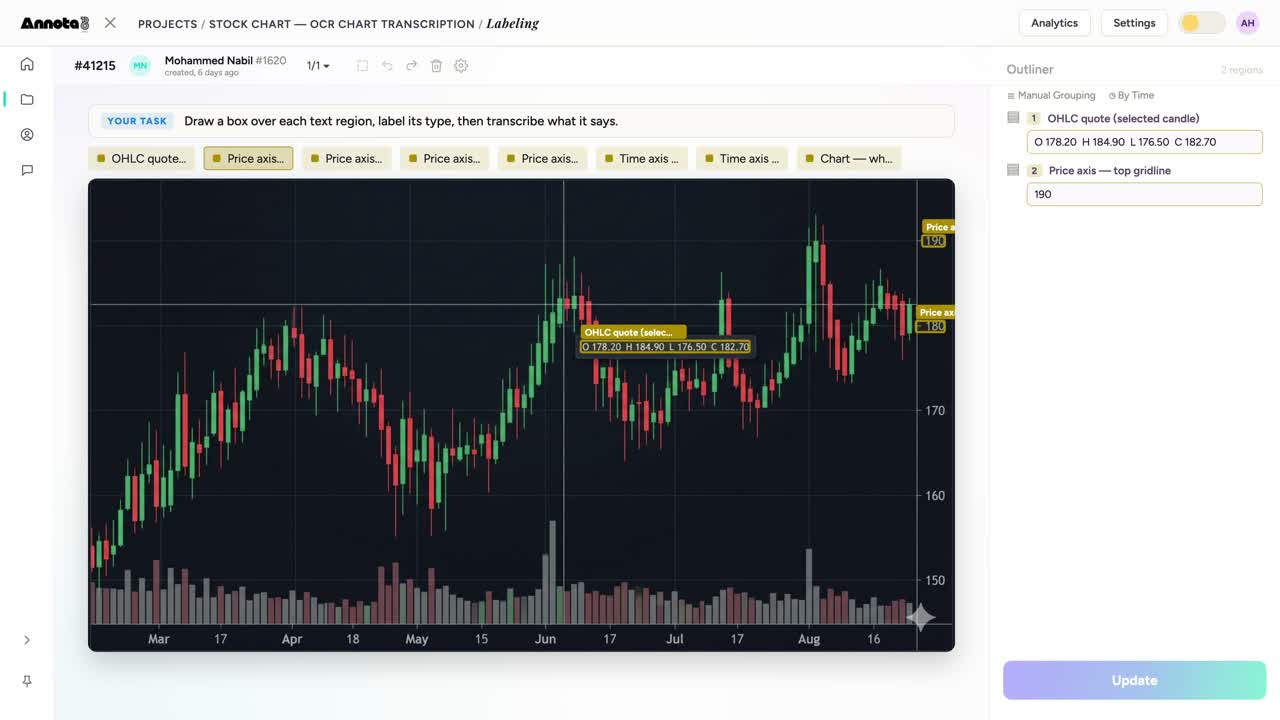
Read a stock chart the way a person does — OHLC quotes, price axis, time axis — boxed and transcribed for the model.
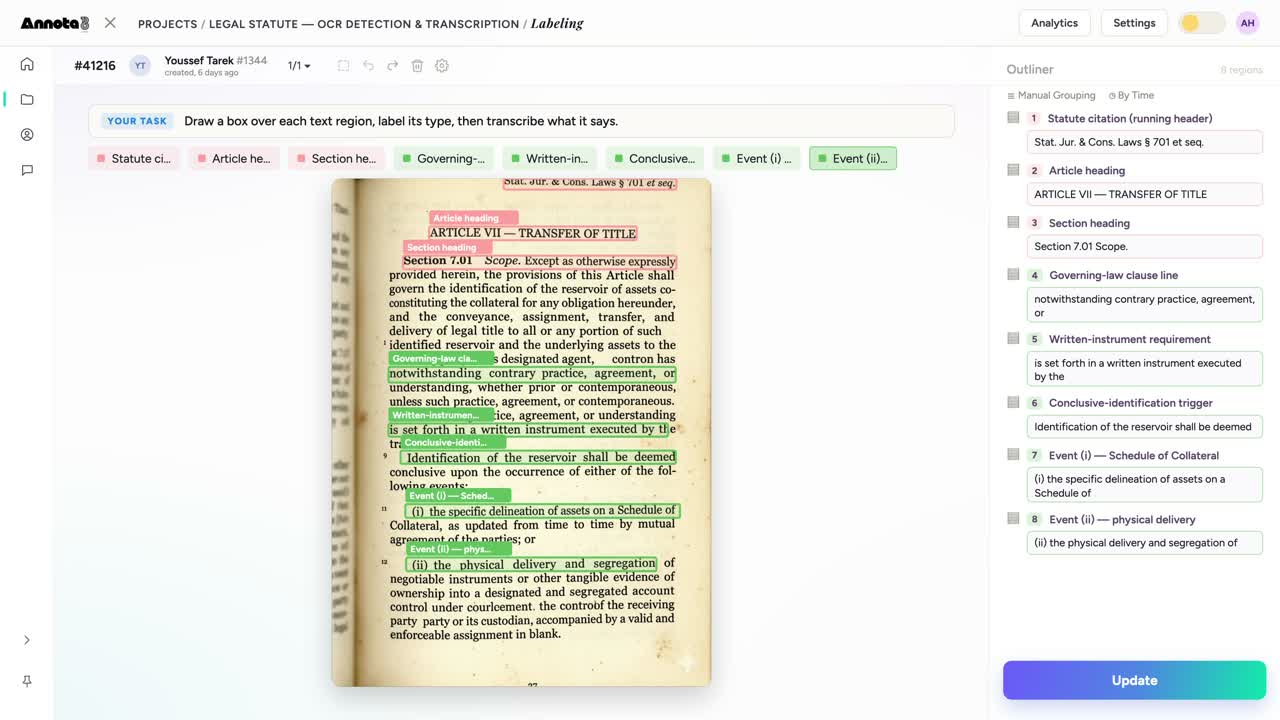
Legal & contract text
Statutes and clauses, labeled by role — article heading, governing-law clause, written-instrument requirement — then transcribed verbatim.
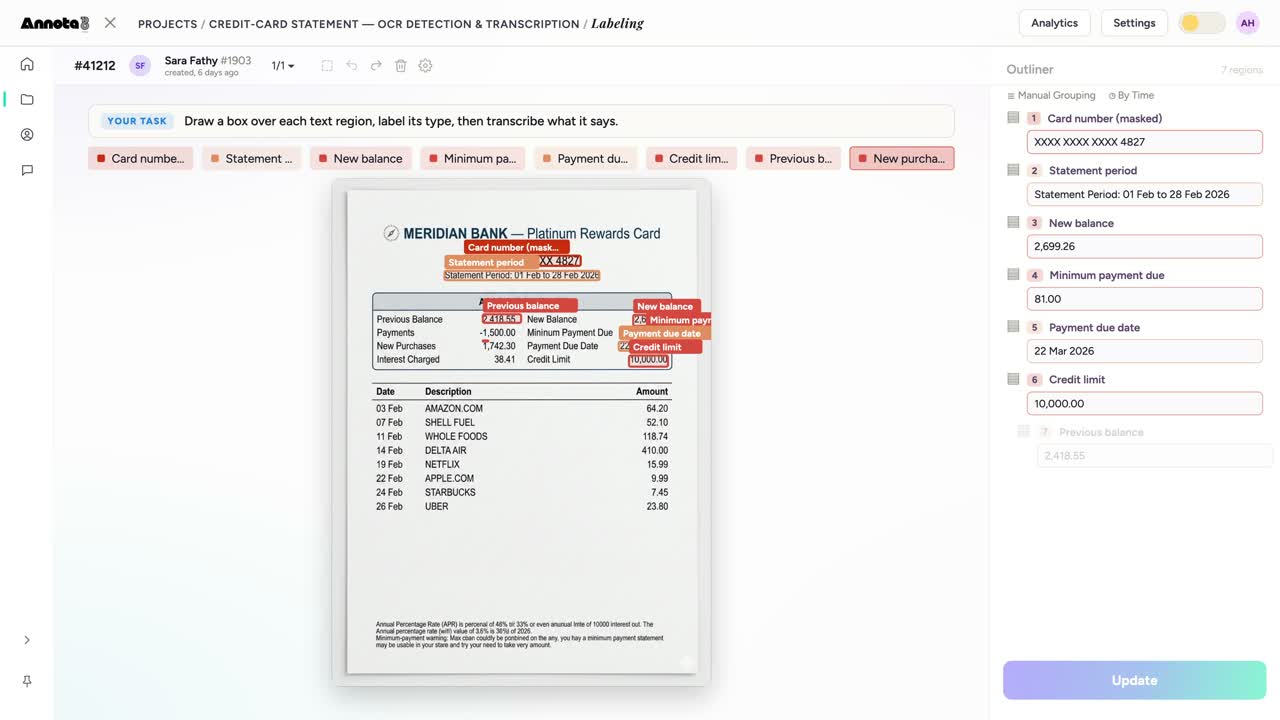
Statements & KYC
A credit-card statement with the card number masked, balances, and the due date each boxed and read — the layout a model must learn.
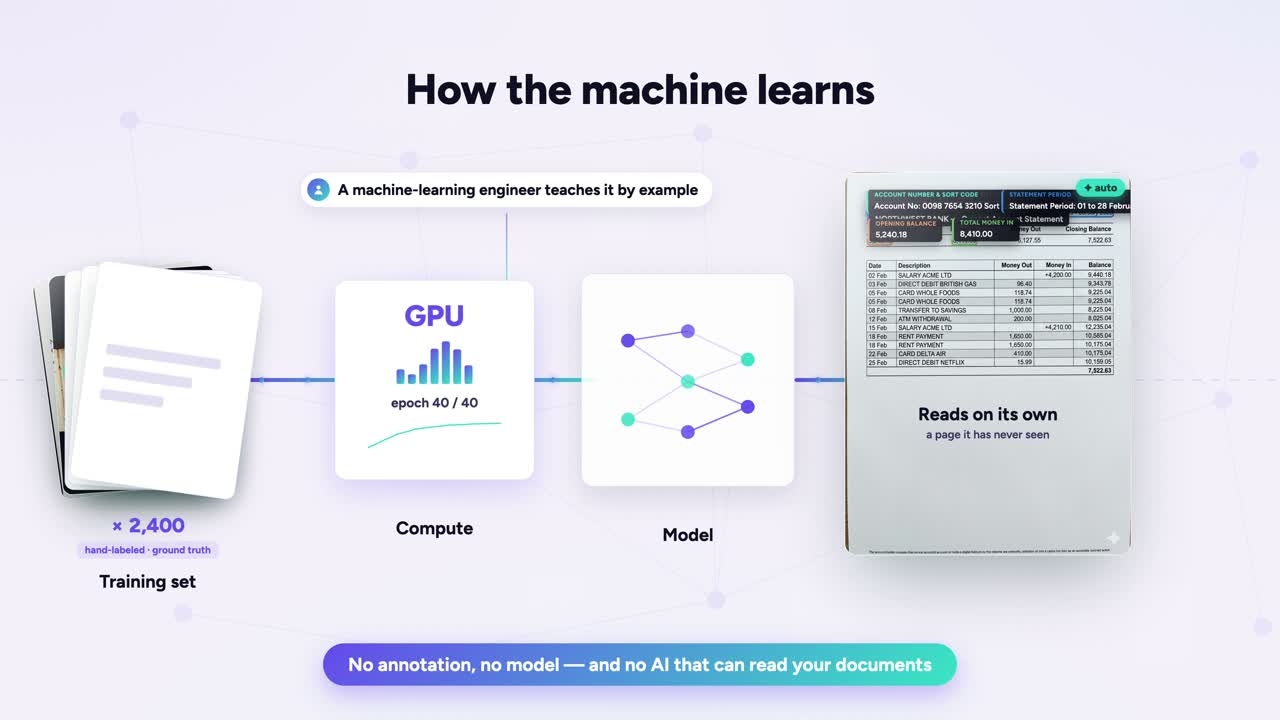
How it learns
Hand-labeled, ground-truth pages train the model until it reads a page it has never seen — the teaching, made visible.
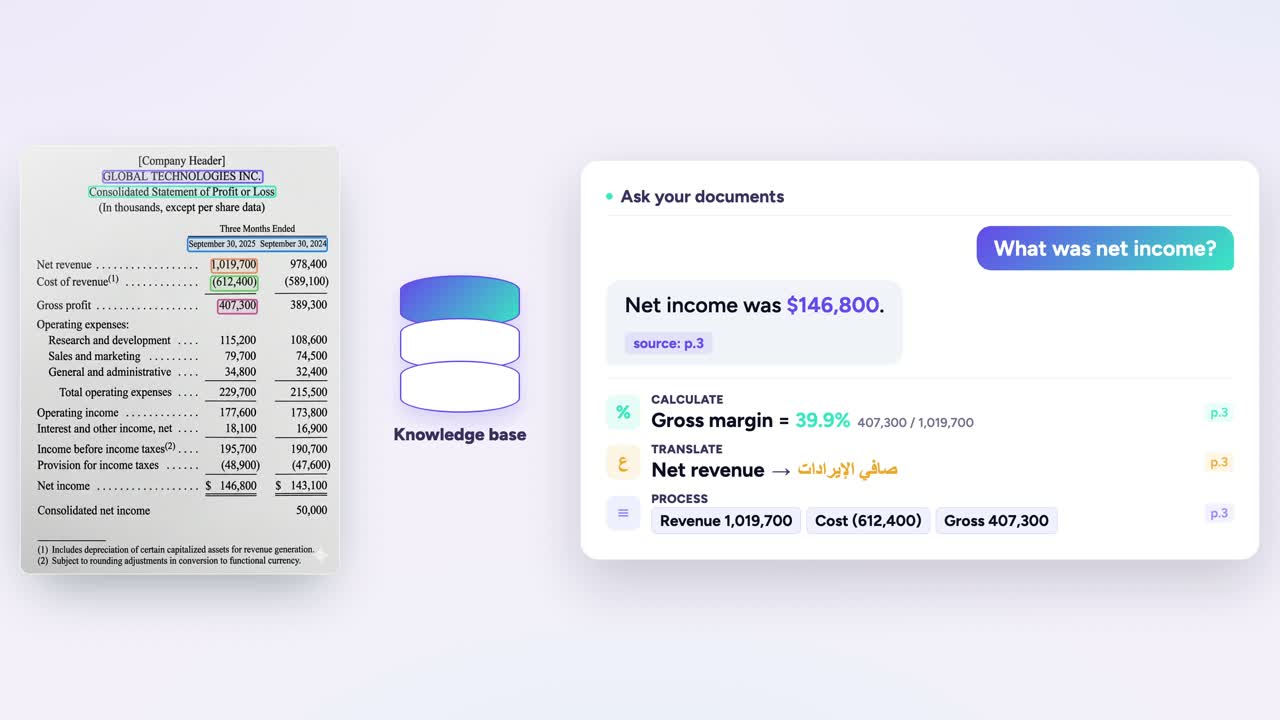
Ask your documents
Once a document is read, the AI assistant answers in plain language — net income, gross margin, even a translation — with the source page cited.
What is OCR annotation?
OCR annotation is the work of teaching a machine to read. A person draws a box or polygon around each text region in an image, labels what that region is, and types out the exact words inside it. That labeled image is the ground truth — the answer key an OCR or document-AI model studies until it can read a page it has never seen.
To you, an invoice is words and numbers. To a machine, it starts as a wall of pixels. Annotation is how the pixels get meaning. It is loosely called text or document annotation, though those terms are broader and also cover NLP and layout labeling.
The work splits into two jobs, and they are not the same:
- Detection — find the text. You draw a tight box around every text region so the model learns where words live on the page. Detection localizes text and outputs a bounding region per instance.
- Recognition — read the text. You transcribe the exact characters inside each box so the model learns what those words say.
Detection draws the box. Recognition reads what is inside it. This is exactly how public benchmarks are built: in the ICDAR Robust Reading localization task, ground truth marks text with word-level boxes; in the end-to-end task you localize each box and return its transcription. A model trained on both can localize text on a fresh page and return the words it contains. No annotation, no model that can read your documents.
Anatomy of one OCR annotation
Every region a person teaches the model carries three things: a box, a type, and the exact text.
"Net income" → 146,800
Words to you, pixels to a machine
Look at an income statement. You read words. "Consolidated Statement of Profit or Loss." Revenue. Net income. A number in a row.
A machine sees none of that. To a machine, the same page is a wall of pixels — a grid of light and dark dots. No words. No rows. No meaning.
So a human teaches it. You draw a box over one text region. You label what kind of text it is. Then you type out what it says. That box-plus-transcription pair is the lesson. It tells the model two things at once: here is where the text lives, and this is what it reads.
This is how the field has done it for years. Natural-scene benchmarks like COCO-Text annotate every text region with a bounding box plus a transcription of the legible text, and even classify each region as machine-printed or handwritten. (COCO-Text reads text in everyday photos rather than scanned documents, but the annotation recipe — box, classify, transcribe — is the same one document OCR uses.) Detect, then read.
One page is one example. A few thousand examples is a training set. And the rule never moves: data quality is a primary driver of model quality. Sloppy boxes teach a sloppy reader. Clean ones are a prerequisite for a model that reads your documents on its own.
How the machine learns: pages become ground truth
An OCR model does not memorize your documents. It learns from them. Supervised learning works from labeled example pairs — an input and its correct output — and the goal is to generalize to new pages, not to reproduce the training set.
Here is the loop. A person opens a page. They draw a box over every text region, label its type, and type out what it says. The boxes teach the machine to see. The transcriptions teach it to read.
Stack up enough of those hand-labeled pages and you have ground truth — examples where the right answer is already written down. Every error in that ground truth teaches the model something wrong, so the human transcribing it is the most important person in the pipeline.
Then comes the training. The pages run across GPUs, epoch after epoch, until the model stops fitting your examples and starts learning the pattern underneath them.
The test is simple. Hand it a page it has never seen — a fresh bank statement — and watch it read on its own. The annotator is the teacher. The transcriptions are the curriculum. The model only knows what a person showed it. Your AI is only as good as the people who taught it.
Detection, recognition, and KIE: three layers, one annotation
Reading a document looks like one job. It is three.
Text detection finds where the words are. Text recognition reads what they say. Key information extraction decides what they mean. Detection and recognition are the two core OCR stages; key information extraction (KIE) is a downstream document-understanding step that adds semantic meaning on top of the OCR output.
Detection draws a box around a text region. Recognition turns those pixels into a string. KIE labels that string as a Company, a Date, a Total. Standard benchmarks split it the same way: the ICDAR Robust Reading end-to-end task counts a word correct only when its box is correctly localized and its transcription matches — location effectively gates the transcription. The SROIE receipt benchmark tags entities as Company, Date, Address, and Total, and FUNSD tags each region as header, question, answer, or other.
A plain bounding box tells a model where to look. A plain class label tells it what kind of thing it found. Neither tells it the words.
OCR annotation carries all three at once. You draw the region. You label its type. You type the text it holds. One annotation, three layers of truth. That is why we built OCR as one control in the Annota8 Annotation Engine: detect, label, and transcribe text regions in the same pass. The human teaches all three layers. The machine learns to read.
Seven kinds of pages OCR annotation unlocks
One OCR control, walked through one page type after another. Here is what each one buys you in the real world.
- Financial documents. Receipts, invoices, purchase orders, bank statements, income statements. A human boxes each region, labels it (Total, Date, Amount), and types what it says. Now your AP system reads a receipt instead of waiting for a clerk to key it in. Benchmarks like CORD — a public receipt post-OCR parsing dataset whose released split is 800 training / 100 validation / 100 test receipts — exist precisely because receipt parsing is its own hard problem.
- Legal and contract documents. Statutes and clauses — an article heading, a governing-law clause, a schedule of collateral. Once a model reads contract structure, you can find every governing-law clause across ten thousand agreements in seconds instead of weeks.
- Charts and figures. A stock chart: the OHLC quote, the price axis, the time axis, the labels. Numbers trapped in a picture become numbers you can query. That is the difference between staring at a screenshot and pulling it into a spreadsheet.
- Identity and KYC documents. Passports, IDs, proof-of-address. Box the fields, label them, transcribe them, and onboarding stops being a manual data-entry queue. Form-understanding datasets like FUNSD — 199 real annotated scanned forms — show why structured fields need their own annotation, not just raw text.
- Handwriting. The OCR schema separates Printed Text from Handwriting for a reason. Writing varies by person and letters connect, which is why dedicated ground-truth sets like the IAM Handwriting Database exist — and the model only learns it from pages a human transcribed first.
- Arabic and multilingual OCR. Arabic letters connect, change shape by position, and carry diacritics, which makes character segmentation genuinely hard. We are Arabic-first and built for it. A model reads Arabic well only when Arabic pages were labeled well.
- Historical and archival scans. Faded ink, odd layouts, old fonts. Box the text regions, transcribe them, and a century of paper becomes searchable text.
One thread runs through all seven: any page becomes training data the moment a human reads it first. Draw the box, label the region, type the text, and the page stops being a wall of pixels and starts teaching the machine to read.
How the Annota8 Annotation Engine does OCR
We built OCR as one control inside the Annota8 Annotation Engine. The job stays simple: detect, label, and transcribe text regions.
Open a page. A bank statement, a receipt, an income statement, a stock chart. Then a person works it line by line:
- Draw a box. A rectangle, or a polygon when the text bends or sits at an angle.
- Label its type. Pick the region kind. Printed Text. Handwriting. Total/Amount. Date. You set the schema.
- Transcribe it. Type what the region says into its own field, one box at a time.
That box-label-text pattern is one configurable interface in a library of 200 annotation interfaces across 9 modalities. The same engine that reads documents also handles image, text, video, audio, signals, and HTML — and it is LIVE today.
Here is the honest part. A model can propose boxes and text for a person to confirm or correct — the standard human-in-the-loop pattern that speeds labeling up. But the human stays in the lead. The model proposes. A person confirms, fixes, and decides what ground truth is. Your AI is only as good as the people who taught it. You can even ask your annotation data in plain language to track quality and progress.
One OCR control, re-pointed for any document
Here is the part most teams miss. You do not build a new control for every document — you re-point the same one.
The OCR control behind our income statement is one config. Rename the region-type labels — swap "Total / Amount" for "Article Heading" and you are reading a statute instead of a balance sheet. Add a field, and each box now carries a date or a currency next to its text. Switch the language to Arabic, and the same canvas reads right-to-left.
Pick your shape per job. Straight printed lines on a receipt? A box is tight enough. Curved or skewed text on a chart or a stamped form? Draw a polygon so the region hugs the text instead of swallowing background that is not ideal ground truth — which is exactly why curved-text benchmarks use polygon labels.
Same engine. A receipt, a contract, a stock chart, a bank statement — one control, re-pointed.
No annotation, no model, no AI that reads your documents
Strip it back and the rule is simple. No annotation, no model, and no AI that can read your documents. Every reading model learned from a person who boxed each text region and transcribed it first. Arabic-first by design — the same OCR control reads English, financial, legal, and handwritten pages just as well. The ICDAR 2019 SROIE benchmark, for example, annotates each image with text bounding boxes and the transcript of each box — that is the ground truth a model learns from.
That is the whole loop. A human draws the box, names the region, and types what it says. The machine watches enough examples to read a page it has never seen.
We built the Annotation Engine for exactly this work, so the people who teach stay in the lead. Teach it to see. Teach it to hear. Teach it to read. Book Demo at annota8.ai.
No annotation, no model — and no AI that can read your documents.Humans teach the machine
Frequently asked questions
OCR annotation is the work of teaching a machine to read. A person draws a box over each text region in an image, labels what kind of text it is, and types out exactly what it says. Those labeled examples become the training data an optical character recognition model learns from. To a machine, a document starts as a wall of pixels; annotation is how it turns into words.
You work region by region over a scanned page or photo. Draw a box (or polygon) over a block of text, assign it a label like Printed Text, Handwriting, Date, or Total, then transcribe the characters inside it. Repeat until every text region is boxed, labeled, and transcribed. Detect, label, and transcribe: that is the whole loop, and it is the loop we built one control for in the Annota8 Annotation Engine.
It is used wherever a business needs a machine to read documents at scale: income statements, bank statements, receipts, purchase orders, invoices, legal statutes, and even text inside charts. A bank automating statement processing, a fintech reading receipts, or a legal team extracting clauses all need an OCR model first — and every one of those models needs hand-labeled pages before it can read a single new document.
OCR is the model that reads. OCR annotation is the human work that teaches it how. To build or fine-tune a model for your documents, the annotation comes first: you label ground-truth pages by hand, the model trains on them, and only then can it read a page it has never seen. Off-the-shelf OCR reads many pages out of the box because someone annotated upstream. No annotation, no model that can read your documents.
Detection finds where the text is; recognition reads what the text says. Detection draws the box around a text region; recognition transcribes the characters inside that box. Many OCR pipelines run them as two stages, which is why a good OCR annotation task captures both: the region geometry and the transcription. Public benchmarks like the ICDAR Robust Reading competitions score detection and recognition as separate tasks for exactly this reason.
Tight boxes, consistent labels, and exact transcriptions. The box should hug the text with no extra background and no clipped characters, the region type should follow one agreed schema across every annotator, and the transcription should match the page character for character, including punctuation and casing. Data quality is a primary driver of model quality: a model trained on sloppy boxes and typo'd transcriptions learns to read sloppily. Your AI is only as good as the people who taught it.
Yes, OCR models read most clean printed text on their own, and you can pre-fill annotations with one to speed labeling up. But they still miss on faint scans, unusual fonts, handwriting, tables, and low-resolution images, and a wrong character in a total or an account number is expensive. ICDAR benchmarks show recognition accuracy drops on degraded and handwritten text, so a human verifies and corrects the machine's output. The pattern is human-in-the-lead: the model drafts, the person confirms the ground truth.
Use a rectangle for upright, straight lines of text; it is faster and fits most printed documents. Use a polygon when the text is curved, slanted, rotated, or wrapped around a shape, where a rectangle would swallow background or clip characters. The ICDAR curved-text benchmarks exist because rectangles fail on this kind of text. In the Annota8 OCR control you can draw either over the same image canvas and switch per region.
Handwriting and Arabic are both harder for a machine, so the annotation has to be more careful. Handwriting varies by person and connects letters, which is why dedicated ground-truth sets like the IAM Handwriting Database exist. Arabic adds right-to-left flow, cursive joining, and letter shapes that change by position, with research corpora like the KHATT database built for Arabic handwriting. We are Arabic-first by design, and the OCR schema treats Arabic and handwritten text as their own region types.
Start with the documents you actually want to read: gather a representative set of pages, agree on a region-type schema, and label them with detection plus transcription until you have enough ground truth to train on. The Annota8 OCR control gives you boxes, polygons, region labels, and a transcription field over your own document images, so your team can detect, label, and transcribe in one place. Book Demo at annota8.ai to see it on your documents.
Sources & further reading
- AWS — What is OCR?
- Rosetta: Large-scale text detection and recognition (arXiv 1910.05085)
- docTR (mindee) — detection + recognition architecture
- Deep Learning OCR (Nanonets)
- ICDAR Robust Reading Competition — Focused Scene Text tasks
- COCO-Text: Dataset and Benchmark for Text Detection and Recognition (arXiv 1601.07140)
- Adobe — What is a pixel
- Grant Thornton — IFRS Example Consolidated Financial Statements (statement of profit or loss)
- Google ML Crash Course — Supervised learning
- Google ML Crash Course — Generalization
- Google ML Glossary — Epoch
- ICDAR2019 SROIE: Scanned Receipt OCR and Information Extraction (arXiv 2103.10213)
- FUNSD: A Dataset for Form Understanding in Noisy Scanned Documents (arXiv 1905.13538)
- CORD: A Consolidated Receipt Dataset for Post-OCR Parsing (clovaai, GitHub — 800/100/100 split)
- Investopedia — OHLC chart (open-high-low-close)
- IAM Handwriting Database (FKI, HEIA-FR)
- KHATT: An open Arabic offline handwritten text database (ScienceDirect)
- Advancements and Challenges in Arabic OCR: A Comprehensive Survey (arXiv 2312.11812)
- Total-Text: curved-text benchmark with polygon annotation (arXiv 1710.10400)
- Appen — Human-in-the-loop approach to AI data quality
- Garbage in, garbage out revisited — Quantitative Science Studies (MIT Press)
Let's teach it.
To see. To hear. To understand.
Put your documents in front of the Annota8 Annotation Engine and watch a model learn to read them — humans in the lead, every step.
Book a demo →