What is keypoint annotation?
So, precisely: keypoint annotation marks (x, y) points on an object's meaningful landmarks — joints, facial features, the parts of a tool — so a model learns its structure and pose, not just where it sits. 1
A keypoint label is three things: the point (an x, y coordinate on a landmark), the skeleton (edges that connect points into a pose you can read), and a visibility flag (visible, occluded, or absent — so the model knows a hidden joint is there, not gone). 3
Different jobs use different point sets — COCO defines 17 body keypoints; MediaPipe tracks 33 for the body, 21 per hand, 468 for the face. And keypoints answer a different question than other labels: a box says where an object is, segmentation says its shape, keypoints say how it's built and posed. That's why one control covers a sprinter and a salmon — the point set changes, the job doesn't. Hold that thought; it's the whole guide.
Keypoint vs. bounding box vs. polygon vs. segmentation
Four ways to label an object. They answer four different questions. Pick the one that matches what the model needs to learn.
| Annotation type | What it captures | Output shape | Use it when the model needs to know… |
|---|---|---|---|
| Bounding box | Location | x, y, w, h rectangle | Where an object is — detection, counting, tracking |
| Polygon | Coarse shape | Ordered vertices outlining the object | A tighter outline than a box, without per-pixel cost |
| Segmentation | Exact shape | Per-pixel mask | The precise silhouette — where the object ends, pixel by pixel |
| Keypoint | Structure & pose | (x, y, v) points + skeleton edges | How an object is built and posed — joints, landmarks, motion |
A box tells a model a runner is here. A mask tells it the exact pixels the runner occupies. Keypoints tell it the knee is bent, the arm is driving back, the trunk is leaning. 939
That's the distinction that decides your label budget. If you only need to find and count objects, boxes are cheaper. If you need to read posture, motion, or expression — a stride, a pinch, a smile — keypoints are the only type that carries it.
This is the cleanest line in computer-vision labeling: location vs. shape vs. structure.
Why keypoint annotation matters: the points are the lesson
To a machine, a sprinter at full speed is a grid of pixels. Nothing more. Drop a point on the shoulder, elbow, wrist, knee, connect them — now it has pose. “412, 287” isn't a shoulder until a person decides it is. That decision, repeated across every frame, is the lesson.
So the training data isn't a side ingredient; it is the lesson. A model is only as good as that pile of hand-placed examples: a point a few pixels off the joint and it repeats the error at scale. (Auditors found label errors of 3.3%+ across ten major ML benchmarks. 18) You can pre-annotate with a model, but a guess isn't ground truth — a person corrects it to joint-center precision and signs off.
Humans teach the machine. Your AI is only as good as the people who taught it.
Humans teach the machine.Your AI is only as good as the people who taught it
How keypoint annotation actually works
It runs the same six steps every time — only the points change: (1) define the schema — which landmarks exist and how the skeleton connects them; (2) place each point at joint-center precision; (3) flag what you can't see (visible / occluded / absent); (4) keep one definition of every landmark across annotators; (5) QA with inter-annotator agreement and a reviewer who sets the gold answer; (6) export to COCO-style JSON that drops straight into training. 20
The Annota8 Annotation Engine runs exactly this: a color-coded keypoints control, a human-authored gold standard, optional ML pre-annotation (the machine proposes, the person decides), and standard export — one of 200 UIs across 9 modalities, all live. Book a demo at info@annota8.ai.
The COCO keypoint format, shown (not just described)
Most guides tell you COCO stores keypoints as "a 3×17 array of x, y, v." Few show you the actual artifact. Here it is — the exact JSON a developer can copy.
{
  "categories": [
    {
      "id": 1,
      "name": "person",
      "keypoints": [
        "nose", "left_eye", "right_eye", "left_ear", "right_ear",
        "left_shoulder", "right_shoulder", "left_elbow", "right_elbow",
        "left_wrist", "right_wrist", "left_hip", "right_hip",
        "left_knee", "right_knee", "left_ankle", "right_ankle"
      ],
      "skeleton": [
        [16,14],[14,12],[17,15],[15,13],[12,13],[6,12],[7,13],
        [6,7],[6,8],[7,9],[8,10],[9,11],[2,3],[1,2],[1,3],
        [2,4],[3,5],[4,6],[5,7]
      ]
    }
  ],
  "annotations": [
    {
      "id": 1001,
      "image_id": 42,
      "category_id": 1,
      "bbox": [212, 88, 130, 410],
      "num_keypoints": 15,
      "keypoints": [
        267,120,2,  280,110,2,  255,110,2,  300,118,1,  240,118,1,
        330,200,2,  210,205,2,  360,290,2,  185,295,2,  375,370,2,
        170,378,2,  315,330,2,  235,332,2,  320,440,2,  232,442,2,
        0,0,0,      0,0,0
      ]
    }
  ]
}
Three things to read off this:
The keypoints array is flat. It's a length-3k list — for the 17 person keypoints that's 51 numbers: x1,y1,v1, x2,y2,v2, …. The order is fixed by the categories[].keypoints name list above it. 37
The visibility flag is the third number in each triplet. v=2 visible, v=1 labeled-but-occluded, v=0 not labeled (and then x=y=0). In the example, both ankles are 0,0,0 — off-frame, so num_keypoints is 15, not 17. 2237
The skeleton is an edge list. Each pair is two 1-indexed keypoints to connect — [16,14] joins left_ankle to left_knee. The skeleton is for structure and visualization; it doesn't add data, it connects it. 37
That's the whole schema. Points, visibility, edges. Drop it into any COCO-compatible pipeline and it trains.
2D, 3D, and whole-body: which keypoint set to use
"Keypoint annotation" is not one job. The dimensionality and the point count change with the question you're answering. Three flavors, cleanly:
2D keypoints — (x, y). A point on the image plane. This is the default and covers most of the field: sports pose, gesture, facial landmarks, animal tracking. COCO's 17-point person set is 2D. Use it when a flat camera view carries the signal you need. 3
3D keypoints — (x, y, z). Adds depth, so the pose reconstructs in space, not just on the picture. MediaPipe Pose and MediaPipe Hands both infer 3D landmarks; the z is a relative depth, not a true metric distance. Use it when the angle out of the plane matters — a hand reaching toward a VR controller, a body twisting away from the camera. 67
Whole-body — COCO-WholeBody, 133 keypoints. Body + face + hands + feet in one annotation: 17 body, 68 face, 42 hand (21 per hand), 6 foot. Use it when one model has to read posture and expression and finger detail at once — sign language, fine-grained interaction, avatar capture. It's the most expensive to label, so reach for it only when you genuinely need all four regions. 12
The rule of thumb: start 2D. Add z only when depth changes the answer. Go whole-body only when the body, face, and hands all carry the lesson.
More points and more dimensions mean more cost and more places to be inconsistent. Every extra landmark is one more thing a human has to place the same way, every time. The schema you pick is a budget decision as much as a technical one.
Use case — sports, fitness & performance: every stride is a set of points
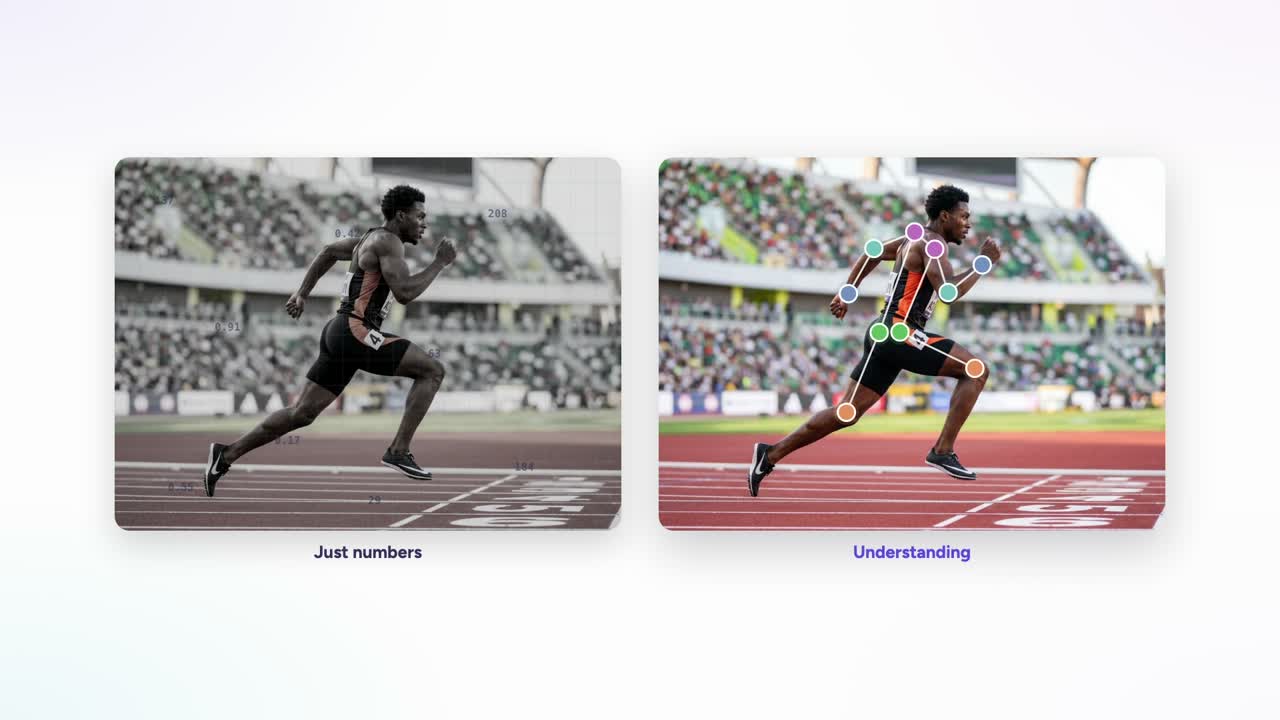
Watch a sprinter at full speed. The eye sees a blur; a keypoint model sees structure — a point on each joint, connected into a skeleton, and now the motion has math: joint angles, stride length, cadence, left-right symmetry, where posture breaks down as fatigue hits.
This used to need a lab full of reflective markers. Now a model places the points straight from video — markerless sprint trackers report joint-angle errors of just 3.2–5.5° against the marker-based reference. 28 It's gone prime time, too: Hawk-Eye tracks 29 skeletal points per player and has called semi-automated offside since 2022. 30
But none of it runs without a human first. A model only knows a “knee” because annotators placed thousands of knees, precisely, at the joint center — the ground truth it learns the stride from. Humans teach the machine. Your AI is only as good as the people who taught it.
Use case — automotive & XR: inside the cabin, and at your fingertips
Two use cases. Same starting move: place a point.
Driver monitoring: the car learns to watch the driver
A driver monitoring system (DMS) watches one thing. The person behind the wheel.
It tracks the head. The eyes. Keypoints on the face that say where you are looking and how awake you are.
Drowsy? The eyelids close longer. Eye aspect ratio drops. Distracted? The head turns off the road. Researchers build these systems on facial-landmark and head-pose keypoints, computing eye-closure and yawn metrics frame by frame. 3233
None of that works without ground truth.
Someone has to label the eye corners. The nose. The head angle. Frame after frame, across drivers, lighting, glasses, night. The model only sees what a human taught it to see.
This is no longer a nice-to-have. Euro NCAP scores direct driver monitoring as part of its safety rating. Cars are expected to track eye gaze and head pose in real time, and to flag drowsiness at highway speeds. Inferring attention from steering input alone is no longer enough. 343536
That pressure is everywhere driver monitoring is headed — and it lands hardest where the roads are deadliest. Road crashes are the leading cause of death in Saudi Arabia, where Vision 2030 targets fewer than 10 road fatalities per 100,000 people by 2030. A car that can tell when a driver is falling asleep isn't a feature there — it's a life saved. 4041
And every one of those cars ships a model trained on labeled keypoints.
Hands: the interface with no buttons
Now move to the hands.
A hand has 21 keypoints. Wrist, knuckles, finger joints, fingertips. MediaPipe Hands infers all 21 as 3D landmarks from a single camera frame. That is the map of a hand. 7
With that map, the machine reads what your hands are doing:
- AR and VR input. A pinch becomes a click. A grab becomes a hold. No controller. 38
- Touchless interfaces. Wave, swipe, point. Control a screen without touching it. 42
- Sign-language recognition. Track the hands, read the sign, turn it into text. Keypoint tracking sits at the core of these systems. 37
But the model that found those 21 points? It was trained on hands a human labeled first. By Google's own account, MediaPipe's hand landmark model was built on roughly 30,000 real-world images, each manually annotated with 21 3D coordinates. 7
That is the whole point. The machine reads a hand because a person taught it where a hand's joints are.
We build the exact same keypoint datasets in the Annota8 Annotation Engine. Color-coded points on a face. Joints on a hand. A hand-authored gold standard as the correct answer. Export as standard JSON. One of 200 annotation UIs across 9 modalities, all live.
From a sleepy driver to a pinching finger, it starts with a point. And a human who placed it.
Use case — faces and bodies: from AR filters to the operating room
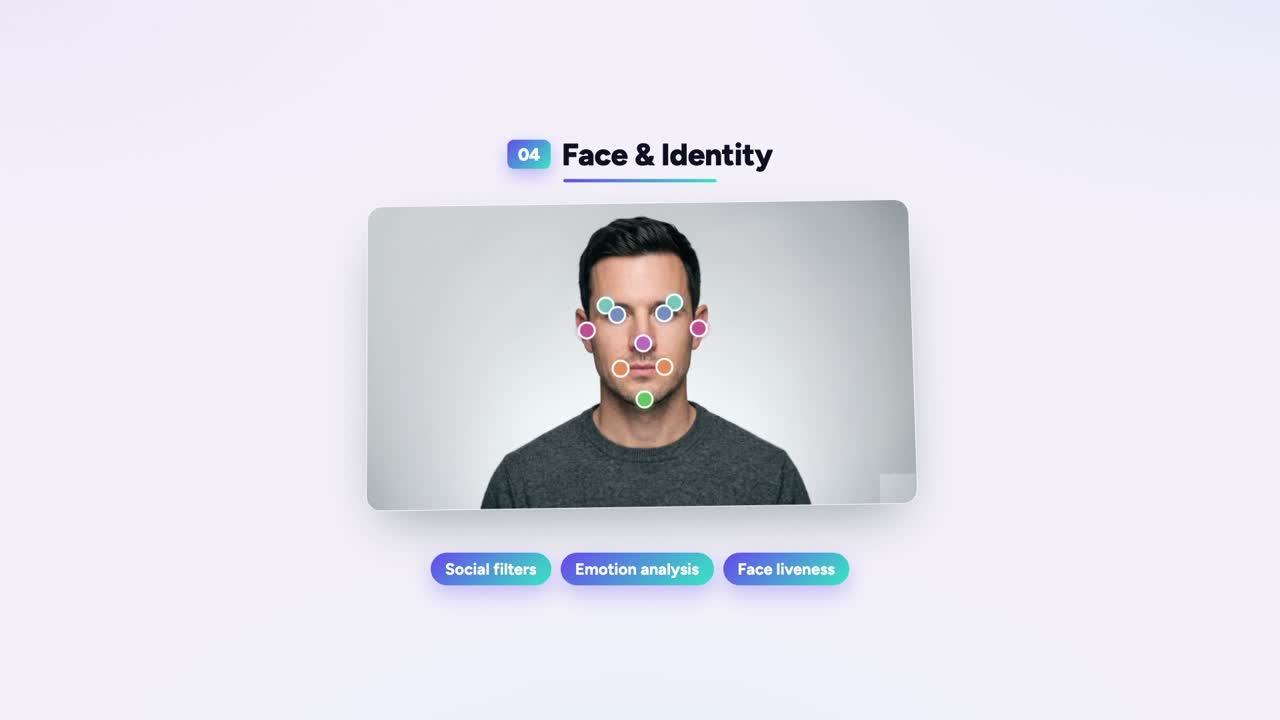
Put enough points on a face, and the machine stops seeing pixels. It starts seeing a face.
That is the whole game. The same keypoints control that snaps a skeleton onto a sprinter snaps a mesh onto a human face. Same idea. Different landmarks.
Faces: filters, expressions, and proving you're real
A face filter has to know where your face is before it can put sunglasses on it. So you label the landmarks: eye corners, nose tip, lip edges, jawline. The classic dlib model uses 68 of them, trained on hand-annotated faces. Google's MediaPipe Face Mesh estimates 468 3D points on a single face from one ordinary camera — no depth sensor. 434445
Those points are how a filter tracks your nose when you turn your head.
Push further and you get expression analysis. Researchers code faces with the Facial Action Coding System (FACS) — adapted by Paul Ekman and Wallace Friesen and published in 1978 — which breaks expressions into "Action Units," the small facial-muscle movements that make a smile or a frown. Map the landmarks, track how they move, and a model can read the action units underneath. 4647
Then there's liveness. Is this a real face, or a photo held up to the camera? That's presentation attack detection, and it has a standard: ISO/IEC 30107-3, which defines how labs test a system's ability to tell a live person from a spoof. The training data behind it is annotated faces — real ones and fakes — labeled so the machine learns the difference. 4849
Our founders built this kind of perception at Affectiva and Smart Eye. The work always came back to the same thing: a model reads faces only as well as the people who labeled the faces it learned from.
Healthcare: precision where it counts
Medicine is where keypoints get serious.
In surgery, researchers track points on instruments — the tool tip, the tool base — so the system knows where a tool is in the frame. It's hard. The tips are small, the tools articulate, they get occluded, the lighting shifts, the video blurs. Every one of those points starts as a human annotation on a frame of surgical video. 5051
In dentistry and orthodontics, the workhorse is cephalometric analysis: marking landmarks on a lateral skull X-ray to plan treatment. Doing it by hand is slow and inconsistent. Deep-learning models now place those landmarks automatically — but they were trained on radiographs a clinician labeled first. 5253
In rehab, there's gait analysis. Markerless pose estimation tracks body keypoints from ordinary video to measure how someone walks — validated in people post-stroke and with Parkinson's against reference motion-capture systems. 545556
One caution we hold to: these are research and assistive tools, not diagnoses. The model proposes. A clinician decides. We build the annotation; we don't make clinical claims.
One control, both worlds
A face mesh and a surgical X-ray look nothing alike. To the keypoints control, they're the same job: put a labeled point exactly where it belongs.
That's what the keypoints control in our Annotation Engine does — color-coded, labeled points placed at landmark precision against a hand-authored gold standard, exported as COCO-compatible JSON. One of 200 UIs across 9 modalities, all live.
From a selfie filter to a root canal, it starts with a point. And a human puts it there.
Use case — agriculture, livestock & aquaculture: from a sprinter to a salmon
A point on a sprinter's knee and a point on a salmon's tail are the same idea. Mark the landmark. Connect the structure. Teach the machine what matters.
Pose annotation left the gym a long time ago. It now runs in fields, in barns, and in sea cages.
Here is what that looks like in the real world.
Crops: where to cut, when to pick.
A strawberry isn't just "ripe or not." A harvest robot needs to know the exact spot to grasp and the exact spot to cut.
So researchers label keypoints on the fruit itself. One public dataset tags five points per strawberry: the picking point, the top and bottom of the fruit, and the left and right grasping points for the gripper. Ripeness gets labeled too — by color, from unripe (green/white) to half-ripe to fully ripe (red). 575859
Those labels are the ground truth. The robot learns where to reach by copying thousands of human-placed points.
Livestock: the limp you can't see by eye.
A lame cow costs money and signals pain. The earliest sign is a change in gait — subtle, easy to miss on a busy farm.
Keypoints catch it. Annotators mark anatomical points on the cow across video frames. One study used five keypoints along the back to measure arching, plus two head keypoints to catch head position. From those tracked points the model reads posture and gait, then flags the limp. 60
Published systems report lameness accuracy in the high 80s to high 90s — one DeepLabCut-based tracker around 87–90%, another posture system 94–100% — all built on human-labeled animal pose. 6061
Aquaculture: counting and measuring fish you can't touch.
You can't put a salmon on a scale every day. So farms measure it with cameras instead.
Annotators place keypoints on the fish — head, tail, fins — and the model learns to read size from those points. One offshore framework on cobia uses four keypoints: head, tail, left fin, right fin. A separate keypoint study reports fish-length estimates around 97% accurate, within roughly a centimeter of ground truth. 6263
Same workflow, different animal: structure marked by a human, measured by a machine.
Wildlife: behavior in the wild, no collar required.
Conservation teams now track animals by pose alone — wild chimpanzees and bonobos, whole elephant herds from drone footage, salmon in research tanks. Tools like DeepLabCut let researchers label keypoints on a few hundred frames, then track posture across hours of video. 64656667
No tags. No collars. Just landmarks a human taught the model to find.
One method. A sprinter to a salmon.
Every one of these starts the same way: a person placing a point at a joint center, a fruit stem, a fin.
That's keypoint annotation in our Annotation Engine — labeled, color-coded points on an image, a human-authored gold standard as the correct answer, exported as standard JSON. One of 200 UIs across 9 modalities, all live.
The animal changes. The method doesn't. Humans teach the machine — and your AI is only as good as the people who taught it.
Ready to teach it to see? Book a demo at annota8.ai.
When a joint is hidden: the occlusion decision table
Occlusion is where most keypoint datasets quietly go wrong. A leg disappears behind the other leg. A hand goes behind a back. An annotator who guesses — or who skips inconsistently — teaches the model noise.
The fix is a written rule, applied the same way every time. COCO gives you the flag; you give it the policy.
| The joint is… | Set v to | Place (x, y)? | Why |
|---|---|---|---|
| Visible in the frame | 2 | Yes — on the landmark | The model learns a confident, seen example |
| Occluded (behind another body part or object) but you can infer where it sits | 1 | Yes — your best estimate of the hidden location | Teaches the model joints exist even when hidden; keeps the skeleton intact |
| Outside the frame / truncated (cut off by the image edge) | 0 | No — set 0, 0 | Nothing to learn here; a guessed off-frame point is pure noise |
| Genuinely absent (the landmark isn't there — e.g. amputation, wrong object) | 0 | No — set 0, 0 | The landmark doesn't exist for this instance |
Two rules make this airtight:
Estimate occluded, never invent absent. If a knee is behind a leg, you know roughly where it is — flag it 1 and place your estimate. If a foot is off the bottom of the frame, you don't — flag it 0 and leave it at the origin. 2223
Decide before you label, then enforce. Write the policy into the guideline with a picture for each row. Inconsistent occlusion handling is one of the quietest ways to poison a dataset — and one of the hardest to debug after training.
This is quality in. The model can't tell "gone" from "behind something" unless your annotators told it the difference, the same way, every time.
How to get keypoint annotation quality: a field-tested checklist
Quality keypoint annotation comes down to one rule: every annotator places the same point in the same spot, every time. Get that, and a model learns clean structure. Miss it, and you teach the machine your noise.
Here is the checklist we run.
1. Lock the ontology first. Decide exactly which points exist and what each one means before anyone labels. The body-pose standard is COCO's 17 keypoints — nose, eyes, ears, shoulders, elbows, wrists, hips, knees, ankles. Hands, faces, and objects need their own ontology. Pick one and write it down. 69
2. Write the guideline, with pictures. "Shoulder" is not an instruction. "Center of the gleno-humeral joint, even when the arm is raised" is. Define each landmark anatomically. Show a correct example and a wrong one for every point.
3. Demand joint-center precision. Keypoints are not "near the elbow." They sit on the joint center. A point that drifts a few pixels each time becomes a model that guesses. In our Annotation Engine, annotators place color-coded points — Shoulder, Elbow, Wrist, Knee — at joint-center precision on the image canvas.
4. Set an explicit occlusion policy. Real images hide things. COCO encodes this with a per-point visibility flag: v=0 not labeled, v=1 labeled but not visible (occluded), v=2 labeled and visible. Decide your rule up front — do annotators estimate a hidden knee, or skip it? Then enforce it. Inconsistent occlusion handling is one of the quietest ways to poison a dataset. 68
5. Handle truncation and multiple subjects. A leg cut off by the frame edge. Two players overlapping. Your guideline must say what to do: which subject gets labeled, how points off-frame are treated, how to keep skeletons from crossing wires. Ambiguity here multiplies fast.
6. Measure inter-annotator agreement — then adjudicate. Have several people label the same images. Compare. The standard tolerance is spatial: how far apart, in pixels, do two annotators land on the same joint. When agreement drops on a specific joint, your guideline is ambiguous, not your annotators. Fix the guideline, retrain, re-measure. Send genuine disagreements to an adjudicator for a gold answer. 70
7. Build a gold standard. A hand-authored "correct answer" set is how you score everyone against truth, not against each other. In our Engine it doubles as the benchmark for pre-annotation: a top-down model like ViTPose, paired with a person detector like YOLO, proposes points, a human corrects them, and the gold set catches drift. 71
Here is the part most teams underrate. COCO's own accuracy metric, OKS (Object Keypoint Similarity), scales the allowed error on each keypoint by how much human annotators disagreed on that point in the first place. COCO measured that spread across 5,000 redundantly labeled images — and a well-defined point like the eye gets a tighter tolerance than a fuzzy one like the hip. The metric is literally built from human consistency. Sloppy points do not just lower one label — they widen the bar the whole field is measured against. 6869
That's why annotation discipline shows up directly in the metric your model reports. How you place and flag a point decides the OKS it can score.
A pose model learns the skeleton you draw. A few points placed badly, repeated across a dataset, and the model learns the wrong joint. Quality in, quality out.
Humans teach the machine. Your AI is only as good as the people who taught it.
Cost and throughput: the honest mechanics
Keypoint annotation is expensive because a person places every point, on every instance, on every frame. Video makes it worse — a 30-second clip at 30 fps is 900 frames. Here's how teams actually keep the bill down without poisoning the data.
Model-assisted pre-labeling. A pose model (YOLO-pose, ViTPose, OpenPose, MediaPipe) drops a first-pass skeleton, and the human corrects instead of placing from scratch. Correcting is faster than authoring. The catch: a confident-but-wrong machine point is easy to rubber-stamp, so the human review stage is not optional. 2771
Frame interpolation for video. Label keypoints on keyframes, let the tool interpolate the joints across the frames between, then spot-check and fix where motion breaks the interpolation. You pay for a fraction of the frames and review the rest.
Multi-view consistency. When you have synchronized cameras, a joint labeled in one view constrains where it sits in the others. One careful pass propagates.
Staged review. Annotate → peer review → adjudicate disagreements → gold-standard audit. Each stage costs time but catches the errors that cost far more after training.
Here's the number that frames all of it: across the data-annotation industry, overhead and rework eat roughly 60% of the budget. Wrong person labels it, it comes back, you redo it — and most of the spend never touched a correct label. That is the tax of bad process, not bad people.
That 60% is exactly the waste we built the Annota8 Annotation Engine to cut: pre-annotation to shrink the first pass, a gold standard to catch drift early, and agreement checks so rework happens before training, not after. The machine proposes, the human decides, and the gold set keeps both honest.
Quality in, quality out. Book a demo at annota8.ai.
Frequently asked questions
Keypoint annotation is the process of marking precise landmarks (like joints or facial points) on images and video as x, y coordinates, so a model learns structure and pose. A human places each point, building the ground truth the AI copies. The examples are the training data. Quality in, quality out.
Keypoint annotation is the human labeling work that creates ground-truth landmarks; pose estimation is the model that learns to predict those landmarks on its own. One teaches, the other repeats. The model is only as good as the points humans placed, which is why annotation quality decides pose accuracy.
COCO uses 17 body keypoints per person: nose, left and right eyes, ears, shoulders, elbows, wrists, hips, knees, and ankles. Each point is stored as three values (x, y, visibility), where visibility is 0 (not labeled), 1 (labeled but occluded), or 2 (labeled and visible).
MediaPipe detects 21 landmarks per hand, 33 pose landmarks for the body, and 468 face mesh landmarks (478 when iris points are added). Combined in Holistic, that is 543 landmarks per person. These schemas guide how human annotators define and label points when building matching training data.
The COCO visibility flag is a value attached to each keypoint: 0 means not labeled, 1 means labeled but occluded (hidden behind something), and 2 means labeled and visible. It tells the model which points it can trust and which positions a human inferred, so occlusion is handled correctly.
Mark an occluded keypoint with visibility 1, placing it at its best-estimated position even though it is hidden. The point still gets labeled; the flag tells the model a human inferred it. This teaches the network to predict joints behind clothing, objects, or other people. Occlusion is the norm in real footage, not the exception.
A bounding box says an object exists somewhere in the frame; keypoint annotation describes its internal structure, joint by joint. Boxes capture extent, keypoints capture topology and pose. For movement, gesture, or biomechanics, you need the points and the skeleton connecting them, not just a rectangle around the subject.
OKS (Object Keypoint Similarity) measures how close predicted keypoints sit to the human-labeled ground truth, scoring between 0 and 1. It normalizes error by object scale and weights points by how precisely each can be located. COCO uses OKS to compute pose Average Precision, much like IoU works for detection.
MPII Human Pose uses 16 body keypoints per person, one fewer than COCO's 17. Different benchmarks define different skeletons, so the right schema depends on your task. Before labeling, lock the keypoint definition and order. A consistent, documented skeleton is what keeps annotators and the trained model in agreement.
Video adds continuity: labelers track the same keypoints across frames so the skeleton stays smooth and consistent. Interpolation between keyframes and model-assisted propagation cut manual work, but humans still verify. The hard parts are motion blur, occlusion, overlapping people, and camera movement, which is exactly where a careful annotator earns the accuracy.
Sports analytics, healthcare and physical therapy, fitness, robotics, AR and VR, workplace safety, and animal or wildlife tracking all rely on keypoint annotation. Each measures movement, from a golf swing's joint angles to a patient's range of motion. Every one of those models was first taught by humans placing points by hand.
Quality is measured with inter-annotator agreement (multiple labelers on the same frames), pixel tolerance thresholds, and reviewer spot checks of occluded or blurred points. Teams often gate annotators against gold-standard labels and overlap a share of work for continuous agreement signals. Tight QA is what separates usable ground truth from noisy data.
Published industry pricing for keypoint annotation can start around $0.015 per object73, but real cost depends on keypoint count, occlusion, video length, and the accuracy bar. Medical or sports biomechanics work costs more because tolerances are tighter. The cheapest label is rarely the right one; rework erases any savings fast.
Yes. The Annota8 Annotation Engine includes a live keypoints control, part of 200 UIs across 9 modalities, so teams place points, build skeletons, and handle visibility on images and video. An AI assistant wired to your annotation data helps. Humans stay in the lead. Book a demo at annota8.ai.
A good skeleton has a fixed keypoint list, a stable index order, and clear rules for occlusion and edge cases, documented before labeling starts. Consistency across annotators matters more than the exact count. The model learns whatever humans define, so a precise, well-taught schema is what produces a precise, reliable pose model.
References
- COCO — Keypoint Detection Task. https://cocodataset.org/#keypoints-2020 — COCO keypoints is a distinct task alongside detection and segmentation; the 17-keypoint human-body standard with per-point visibility and skeleton connections.
- COCO Keypoints format — CVAT docs. https://docs.cvat.ai/docs/dataset_management/formats/format-coco-keypoints/ — COCO keypoint format: each keypoint = (x, y, v) with v∈{0,1,2}; a 'skeleton' field defines edges connecting keypoints; 17 keypoints.
- COCO-Pose Dataset — Ultralytics Docs. https://docs.ultralytics.com/datasets/pose/coco/ — COCO-Pose uses 17 keypoints per person; kpt_shape [17,3] = x, y, visibility; named joint list; COCO-Pose JSON consumable by training pipelines.
- MPII Human Pose Dataset — Max Planck Institute for Informatics. https://www.mpi-inf.mpg.de/departments/computer-vision-and-machine-learning/software-and-datasets/mpii-human-pose-dataset — MPII annotates 16 body joints per person with a visibility flag; ~25k images, 40k+ people (Andriluka et al., CVPR 2014).
- OpenPose BODY_25 model — CMU Perceptual Computing Lab. https://github.com/CMU-Perceptual-Computing-Lab/openpose/tree/master/models/pose/body_25 — BODY_25 is OpenPose's default 25-keypoint body/foot model (includes foot keypoints).
- MediaPipe Pose — Google AI Edge. https://github.com/google-ai-edge/mediapipe/blob/master/docs/solutions/pose.md — MediaPipe Pose infers 33 3D landmarks; coordinates normalized to [0,1] by image width (x) and height (y).
- MediaPipe Hands — Google AI Edge. https://github.com/google-ai-edge/mediapipe/blob/master/docs/solutions/hands.md — MediaPipe Hands infers 21 3D landmarks per hand from a single frame; ~30K real-world images manually annotated with 21 3D coordinates as ground truth.
- MediaPipe Face Mesh — official docs (readthedocs mirror). https://mediapipe.readthedocs.io/en/latest/solutions/face_mesh.html — Face Mesh produces 468 landmarks by default; 478 with refine_landmarks=True (adds 10 iris points, 5 per eye).
- COCO Dataset — Ultralytics Docs. https://docs.ultralytics.com/datasets/detect/coco/ — COCO supports object detection (bounding boxes), segmentation (masks), and keypoint detection — three distinct annotation tasks: location vs. shape vs. structure.
- Keypoint Annotation: Labeling Data With Keypoints & Skeletons — V7. https://www.v7labs.com/blog/keypoint-annotation-guide — Keypoint annotation = marking landmark points connected by skeleton edges; keypoint/pose/landmark used interchangeably; captures structure/pose vs. location (box) and shape (segmentation).
- COCO Dataset — Data Format (keypoints). https://cocodataset.org/#format-data — COCO keypoint annotation stores each keypoint as [x, y, v]; v=0 not labeled, v=1 labeled-but-not-visible, v=2 labeled-and-visible; person category defines 17 keypoints.
- COCO-WholeBody data_format.md. https://github.com/jin-s13/COCO-WholeBody/blob/master/data_format.md — Body keypoints field is a length 3*17 array (x, y, v); enumerates the 17 names; v=0/1/2 semantics. COCO-WholeBody adds face (68), hands (42), feet (6) for 133 total.
- Lin et al., Microsoft COCO: Common Objects in Context (ECCV 2014). https://arxiv.org/abs/1405.0312 — Origin of the COCO dataset and its per-instance human annotation pipeline; anchors COCO as the standard reference for keypoint/landmark ground-truth labeling.
- OpenPose: Realtime Multi-Person 2D Pose Estimation Using Part Affinity Fields (Cao et al.). https://arxiv.org/abs/1812.08008 — OpenPose is a foundational open-source bottom-up multi-person 2D pose-estimation system (body/foot/hand/face keypoints).
- Deep High-Resolution Representation Learning for Human Pose Estimation (HRNet, Sun et al., CVPR 2019). https://arxiv.org/abs/1902.09212 — HRNet is an established human-pose model trained on hand-labeled ground truth (COCO/MPII); supervised learning reproduces human-placed keypoints.
- ViTPose: Simple Vision Transformer Baselines for Human Pose Estimation (Xu et al., NeurIPS 2022). https://arxiv.org/abs/2204.12484 — ViTPose is an established vision-transformer pose-estimation model.
- Pose Estimation — Ultralytics Docs. https://docs.ultralytics.com/tasks/pose/ — YOLO-pose (YOLOv8-Pose / YOLO11-Pose) is a single-pass pose model; default human model uses the 17 COCO keypoints.
- Pervasive Label Errors in Test Sets Destabilize ML Benchmarks (Northcutt, Athalye, Mueller). https://arxiv.org/abs/2103.14749 — Annotation errors in test data average ≥3.3% (>6% in ImageNet validation) and destabilize model evaluation — backs 'quality in, quality out' / error propagation.
- cocoapi Issue #130 — 'making own COCO data: what does visible mean?'. https://github.com/cocodataset/cocoapi/issues/130 — Confirms the v=0 (not labeled, x=y=0), v=1 (labeled, occluded), v=2 (labeled, visible) convention and that annotators flag occluded keypoints rather than dropping them. COCO-Pose JSON drops into training pipelines.
- COCO format — CVAT documentation. https://docs.cvat.ai/docs/dataset_management/formats/format-coco/ — COCO stores annotations as JSON with separate bbox (location), segmentation (shape), and keypoints fields; person keypoints = 17 each as x,y + visibility flag v=0/1/2; export is JSON.
- Create COCO Annotations From Scratch — Immersive Limit. https://www.immersivelimit.com/tutorials/create-coco-annotations-from-scratch — Walkthrough of the COCO JSON schema (images, annotations, categories; bbox, segmentation, keypoints) and the visibility-flag handling for occluded vs off-frame points.
- On-device, Real-time Body Pose Tracking with MediaPipe BlazePose — Google Research. https://research.google/blog/on-device-real-time-body-pose-tracking-with-mediapipe-blazepose/ — MediaPipe Pose uses the BlazePose 33-keypoint topology, a superset of COCO's 17.
- MediaPipe Hands — official docs (readthedocs mirror). https://mediapipe.readthedocs.io/en/latest/solutions/hands.html — MediaPipe Hands infers 21 3D landmarks per hand from a single frame.
- MediaPipe Face Mesh documentation — Google AI Edge. https://github.com/google-ai-edge/mediapipe/blob/master/docs/solutions/face_mesh.md — MediaPipe Face Mesh estimates 468 3D face landmarks in real time from a single camera with no depth sensor; x,y normalized to [0,1].
- Maji et al., YOLO-Pose: Multi-Person Pose Estimation with OKS Loss (CVPRW 2022). https://arxiv.org/abs/2204.06806 — YOLO-pose jointly detects person boxes and 2D poses (keypoints) in a single forward pass — supports the ML pre-annotation 'first-pass skeleton' claim.
- VideoRun2D: Cost-Effective Markerless Motion Capture for Sprint Biomechanics. https://arxiv.org/abs/2409.10175 — Markerless sprint biomechanics from standard video (MoveNet-based) reports joint-angle errors of 3.2–5.5° vs the marker-based reference across trunk, hip, and knee.
- Internet-of-Things-Enabled Markerless Running Gait Assessment from a Single Smartphone Camera (Sensors, MDPI). https://www.ncbi.nlm.nih.gov/pmc/articles/PMC9866353/ — Markerless running gait assessment from a single smartphone camera (BlazePose, 33 keypoints) validated against Vicon — viable for injury-prevention/low-resource settings.
- Making Sport Fairer with Accurate Event Detection — Hawk-Eye Innovations. https://www.hawkeyeinnovations.com/news/4227979/making-sport-fairer-with-accurate-event-detection-the-future-of-officiating-via-skeletal-tracking — Hawk-Eye's SkeleTRACK tracks 29 skeletal points per player; semi-automated offside (ball + skeletal tracking) deployed in major professional football since 2022.
- NBA to use Hawk-Eye tracking system to follow players, ball — ESPN. https://www.espn.com/nba/story/_/id/35818363/nba-use-hawk-eye-tracking-system-follow-players-ball — NBA adopted Sony's Hawk-Eye 3D optical pose-tracking from the 2023-24 season to follow every player and the ball.
- Real-time driver monitoring system with facial landmark-based eye closure detection and head pose recognition (Scientific Reports 2023). https://pmc.ncbi.nlm.nih.gov/articles/PMC10600215/ — DMS tracks the driver's head and eyes via facial-landmark estimation, with head-pose (inattention) and eye-closure (drowsiness) modules.
- Driver Drowsiness Detection Using EAR, MAR, and Head Pose Estimation (Springer). https://link.springer.com/chapter/10.1007/978-981-16-5987-4_63 — Drowsiness detection uses Eye Aspect Ratio from facial landmarks (longer closure lowers EAR), yawn via Mouth Aspect Ratio, and distraction from head pose.
- Occupant Status Monitoring — Euro NCAP (ratings explained). https://www.euroncap.com/en/car-safety/the-ratings-explained/safety-assist/occupant-status-monitoring/ — Euro NCAP scores direct Driver State Monitoring within Safety Assist; assesses distraction, fatigue/drowsiness, and unresponsiveness from eye gaze and head posture.
- Euro NCAP Assessment Protocol — SA Safe Driving v10.4. https://www.euroncap.com/media/80158/euro-ncap-assessment-protocol-sa-safe-driving-v104.pdf — Direct Driver State Monitoring protocol (from Jan 2023): detect distraction, drowsiness/fatigue and unresponsiveness from eye-gaze and head-posture, including highway-speed fatigue.
- European NCAP Program Developments to Address Driver Distraction, Drowsiness and Sudden Sickness (Frontiers in Neuroergonomics). https://www.frontiersin.org/journals/neuroergonomics/articles/10.3389/fnrgo.2021.786674/full — Euro NCAP drives camera-based direct driver-state monitoring; indirect/steering-based inference alone is treated as insufficient for full credit.
- What is the COCO Keypoint Annotation Format? — Roboflow. https://roboflow.com/formats/coco-keypoint — COCO stores keypoints as a length-3k array of x,y,v triples plus num_keypoints; categories define a keypoint name list and a 'skeleton' edge-pair list (e.g. [16,14]); restates v=0/1/2.
- Comparing Controller With the Hand Gestures Pinch and Grab for Picking Up and Placing Virtual Objects (arXiv). https://arxiv.org/pdf/2202.10964 — Pinch and grab hand gestures serve as controller-free input for manipulating virtual objects in VR.
- Keypoint Annotation vs. Bounding Box: What's the Difference?. https://www.infosearchbpo.com/bpo-news/keypoint-annotation-vs-bounding-box-whats-the-difference/ — Bounding boxes give object location (x,y,w,h); keypoints capture structure/feature points; segmentation captures exact pixel shape — the three-way taxonomy.
- Impact of Vision 2030 on traffic safety in Saudi Arabia (Int. J. Pediatrics and Adolescent Medicine). https://pmc.ncbi.nlm.nih.gov/articles/PMC6363273/ — Road traffic accidents are a leading cause of death in Saudi Arabia; Vision 2030 targets fewer than 10 road fatalities per 100,000 by 2030.
- Reducing Road Crash Deaths in the Kingdom of Saudi Arabia — WHO. https://www.who.int/news/item/20-06-2023-reducing-road-crash-deaths-in-the-kingdom-of-saudi-arabia — Corroborates the scale of Saudi road-crash mortality and the national/Vision 2030 push to cut road fatalities.
- Gesture Recognition: How Touchless Control Works — Ultralytics. https://www.ultralytics.com/blog/vision-ai-enables-touch-free-gesture-recognition-technology — Hand keypoints (fingertips/joints) power gesture recognition for AR/VR and touchless interfaces — pinch to zoom/grab, swipe to navigate, point to select.
- Facial landmarks with dlib, OpenCV, and Python — PyImageSearch. https://pyimagesearch.com/2017/04/03/facial-landmarks-dlib-opencv-python/ — dlib's pre-trained detector estimates 68 (x,y) facial landmark points across eyes, eyebrows, nose, mouth, and jawline; trained on the iBUG 300-W dataset.
- dlib C++ Library — face_landmark_detection.py. https://dlib.net/face_landmark_detection.py.html — Official dlib example using the 68-point shape predictor for facial landmark detection.
- MediaPipe Face Mesh documentation (google-ai-edge/mediapipe). https://github.com/google-ai-edge/mediapipe/blob/master/docs/solutions/face_mesh.md — MediaPipe Face Mesh estimates 468 3D face landmarks from a single camera with no dedicated depth sensor.
- Facial Action Coding System — Wikipedia. https://en.wikipedia.org/wiki/Facial_Action_Coding_System — FACS, adapted by Paul Ekman and Wallace V. Friesen and published in 1978, decomposes facial expressions into Action Units (facial-muscle movements).
- Facial Action Coding System — Paul Ekman Group. https://www.paulekman.com/facial-action-coding-system/ — FACS (Ekman and Friesen) encodes facial expressions as Action Units representing facial-muscle movements; underpins facial expression/affective analysis.
- ISO/IEC 30107-3:2017 — Biometric presentation attack detection — Part 3: Testing and reporting. https://cdn.standards.iteh.ai/samples/67381/653843ba232d403998c64a4aaad6d2cc/ISO-IEC-30107-3-2017.pdf — International standard defining PAD testing methodology and metrics (APCER, BPCER) — distinguishing a live face from a spoof such as a printed photo or screen replay.
- The ISO/IEC 30107-3 standard for testing of Presentation Attack Detection — NIST/IBPC. https://www.nist.gov/system/files/documents/2020/09/15/12_buschthieme-ibpc-pad-160504.pdf — Confirms ISO/IEC 30107-3 governs PAD testing and reporting and defines APCER/BPCER metrics.
- Video-based Surgical Tool-tip and Keypoint Tracking using Multi-frame Context-driven Deep Learning Models (arXiv:2501.18361). https://arxiv.org/abs/2501.18361 — Deep-learning models track surgical tool-tip and tool-base keypoints in video; challenging due to changing lighting, occlusions, motion blur, and tool articulation.
- ToolTipNet: A Segmentation-Driven Deep Learning Baseline for Surgical Instrument Tip Detection (arXiv:2504.09700). https://arxiv.org/html/2504.09700v1 — Deep-learning detection of small surgical instrument tips on surgical video; corroborates that tool tips are small and hard to localize.
- Deep Learning Techniques for Automatic Lateral X-ray Cephalometric Landmark Detection: Is the Problem Solved? (arXiv:2409.15834). https://arxiv.org/html/2409.15834v1 — Cephalometric analysis marks landmarks on lateral skull/dental X-rays for orthodontic planning; deep-learning models do automated landmark detection, trained on clinician-labeled radiographs.
- A fully deep learning model for the automatic identification of cephalometric landmarks (PMC8479429). https://pmc.ncbi.nlm.nih.gov/articles/PMC8479429/ — Deep-learning model automatically identifies cephalometric landmarks on lateral cephalograms, trained on radiographs labeled by clinicians.
- Validity of AI-Driven Markerless Motion Capture for Spatiotemporal Gait Analysis in Stroke Survivors (Sensors 2025). https://pmc.ncbi.nlm.nih.gov/articles/PMC12431465/ — Markerless video-based motion-capture gait analysis validated in 19 stroke survivors against a reference instrumented walkway, with good-to-excellent validity for most gait parameters.
- Validity of AI-based markerless motion capture for clinical gait analysis in healthy adults and adults with Parkinson's disease (J Biomechanics 2023). https://www.sciencedirect.com/science/article/abs/pii/S0021929023002142 — AI-based markerless motion-capture spatiotemporal gait parameters validated in adults with Parkinson's disease against a marker-based reference.
- Video-Based Pose Estimation for Gait Analysis in Stroke Survivors during Clinical Assessments (PMC8832219, Digital Biomarkers). https://pmc.ncbi.nlm.nih.gov/articles/PMC8832219/ — Markerless video pose estimation (DeepLabCut) tracks body keypoints (hip, knee, ankle, heel, toe) from single-camera video to estimate gait parameters in stroke patients.
- Keypoint Detection and 3D Localization Method for Ridge-Cultivated Strawberry Harvesting Robots (MDPI Agriculture, 2025). https://www.mdpi.com/2077-0472/15/4/372 — Strawberry keypoint dataset annotates five key points per fruit (picking point, top, bottom, left and right grasping points) to plan the end-effector trajectory.
- Modular autonomous strawberry picking robotic system (Parsa et al., Journal of Field Robotics, 2024 / Robofruit). https://onlinelibrary.wiley.com/doi/full/10.1002/rob.22229 — Confirms the five-keypoint strawberry scheme (picking point, top, bottom, left and right grasping points) with pluckability labels on a glasshouse dataset.
- Strawberry Detection and Ripeness Classification Using YOLOv8+ Model and Image Processing (MDPI Agriculture, 2024). https://www.mdpi.com/2077-0472/14/5/751 — Strawberry ripeness classified by color, from unripe (white/green) through half-ripe to fully ripe (red).
- Deep learning pose estimation for multi-cattle lameness detection (Barney et al., Scientific Reports, 2023). https://www.nature.com/articles/s41598-023-31297-1 — Mask-RCNN outputs 5 keypoints for back arching and 2 for head position (15 anatomical points annotated); posture/gait analysis at 94–100% accuracy, scored by accredited mobility scorers.
- Intelligent Deep Learning and Keypoint Tracking-Based Detection of Lameness in Dairy Cows (MDPI Veterinary Sciences, 2025). https://pmc.ncbi.nlm.nih.gov/articles/PMC11946227/ — DeepLabCut-based keypoint tracking (head, back, four feet) for cow lameness reaches ~90% accuracy (≈87% with logistic regression in related work) — the high-80s-to-90s range.
- Fish keypoint detection for offshore aquaculture: a robust deep learning approach with PCA-based shape constraint (Frontiers in Marine Science, 2025). https://www.frontiersin.org/journals/marine-science/articles/10.3389/fmars.2025.1619457/full — Offshore cobia framework detects four keypoints — head, left fin, tail, right fin.
- A review of deep learning-based stereo vision techniques for fish phenotype and behavioral analysis in aquaculture (Artificial Intelligence Review, Springer, 2024). https://link.springer.com/article/10.1007/s10462-024-10960-7 — Documents a keypoint method (nose-tip and tail-midpoint landmarks, stereo calibration) achieving ~97% fish-length accuracy within ±1.15 cm.
- DeepWild: Application of DeepLabCut for behaviour tracking in wild chimpanzees and bonobos (Wiltshire et al., Journal of Animal Ecology, 2023). https://besjournals.onlinelibrary.wiley.com/doi/full/10.1111/1365-2656.13932 — DeepLabCut trained on hand-held video for multi-animal pose estimation/behaviour tracking of wild chimpanzees and bonobos without tags or collars.
- Whole-Herd Elephant Pose Estimation from Drone Data for Collective Behavior Analysis (McNutt, Zhang et al., 2024). https://arxiv.org/abs/2411.00196 — Pose estimation (DeepLabCut, YOLO-NAS-Pose) detects keypoints (head, spine, ears) for whole herds of elephants from drone footage — wildlife behavior without physical tags.
- Applying deep learning and the ecological home range concept to document spatial distribution of Atlantic salmon parr in tanks (Scientific Reports, 2025). https://www.nature.com/articles/s41598-025-90118-9 — Adapts DeepLabCut to pose-estimate Atlantic salmon parr in experimental tanks for welfare/spatial-distribution monitoring.
- DeepLabCut: markerless pose estimation of user-defined body parts with deep learning (Mathis et al., Nature Neuroscience, 2018). https://www.nature.com/articles/s41593-018-0209-y — DeepLabCut achieves human-level tracking by labeling only ~200 frames, supports user-defined keypoints, and tracks posture across long videos.
- COCO Keypoint Evaluation (cocodataset.github.io source). https://github.com/cocodataset/cocodataset.github.io/blob/master/dataset/keypoints-eval.htm — OKS formula and per-keypoint sigma derived from the std dev of human annotations relative to object scale; computed from 5,000 redundantly annotated images; eyes tight, hips/ankles loose; v=0/1/2.
- Object Keypoint Similarity in Keypoint Detection — LearnOpenCV. https://learnopencv.com/object-keypoint-similarity/ — OKS is the COCO standard pose metric, a distance-based analog of IoU; per-keypoint constant reflects inter-annotator variability (eyes tight, wrist/elbow looser).
- Keypoint Annotation — Definition & Training Data (Claru). https://claru.ai/glossary/keypoint-annotation — Keypoint QA uses multi-annotator agreement via mean pixel distance and tolerance thresholds; low per-keypoint agreement flags ambiguous guidelines, not annotator blame; keypoints sit at joint centers.
- ViTPose — How to use the best Pose Estimation Model (Supervisely). https://supervisely.com/blog/vitpose-state-of-the-art-pose-estimation-model-in-supervisely/ — ViTPose is a top-down model needing an external person detector (e.g. YOLO) to supply boxes, then estimates keypoints per crop; can pre-label pose skeletons for humans to correct.
- YOLOv7 Pose vs MediaPipe in Human Pose Estimation — LearnOpenCV. https://learnopencv.com/yolov7-pose-vs-mediapipe-in-human-pose-estimation/ — YOLO-pose detects persons and extracts the 17 COCO keypoints in a single forward pass (box + keypoints predicted simultaneously).
- Data Annotation Pricing — Label Your Data. https://labelyourdata.com/pricing — published keypoint annotation rate starts at $0.015 per object (bounding box $0.02).